
Custom Quote Hero Documentation
This documentation explains how Custom Quote Hero works, what data it stores,
and how to safely use the quote workflow to generate checkout-ready WooCommerce products.
Requirements & Compatibility
Custom Quote Hero is designed to work with standard WooCommerce products and a clean WordPress setup.
- WooCommerce
Required. Custom Quote Hero adds quote mode to selected WooCommerce products and generates purchasable quote products.
Notes:
- This plugin is built specifically for WooCommerce workflows and does not run without WooCommerce.
- Generated quote products use standard WooCommerce checkout (no custom checkout system).
- Automation features (saved templates, quote product management, purchase detection) are planned as optional Pro add-ons.
Quick Navigation
- What does this plugin do?
- How do I enable Quote Mode on a product?
- How do Custom Quote Fields work?
- How do pipe-separated dropdown options work?
- What does the customer see on the product page?
- Where do quote requests appear in the dashboard?
- How do I review a quote request?
- How do I add pricing and generate quote products?
- How do I send checkout links to the customer?
- Where are generated quote products stored?
- Is this workflow safe for production use?
- Are Pro / add-on features planned?
What does this plugin do?
Custom Quote Hero is a quote-to-checkout workflow for WooCommerce products that cannot be priced upfront.
Instead of forcing customers to guess, you collect the job details first, then generate one or more
checkout-ready products based on the pricing you choose.
This plugin is ideal for:
- Print shops (labels, decals, stickers, banners)
- Sign shops and display products
- Custom manufacturing / made-to-order items
- Wholesale or bulk pricing requests
- Any product where final pricing must be approved manually
How do I enable Quote Mode on a product?
- Edit an existing WooCommerce product (or create a new one).
- Scroll down to the Product Data panel.
- Click the Custom Quote tab.
- Check Enable Custom Quote Mode for this product.
- Save / Update the product.
Once enabled, the standard Add to Cart area is replaced with a Request Quote form for that product.
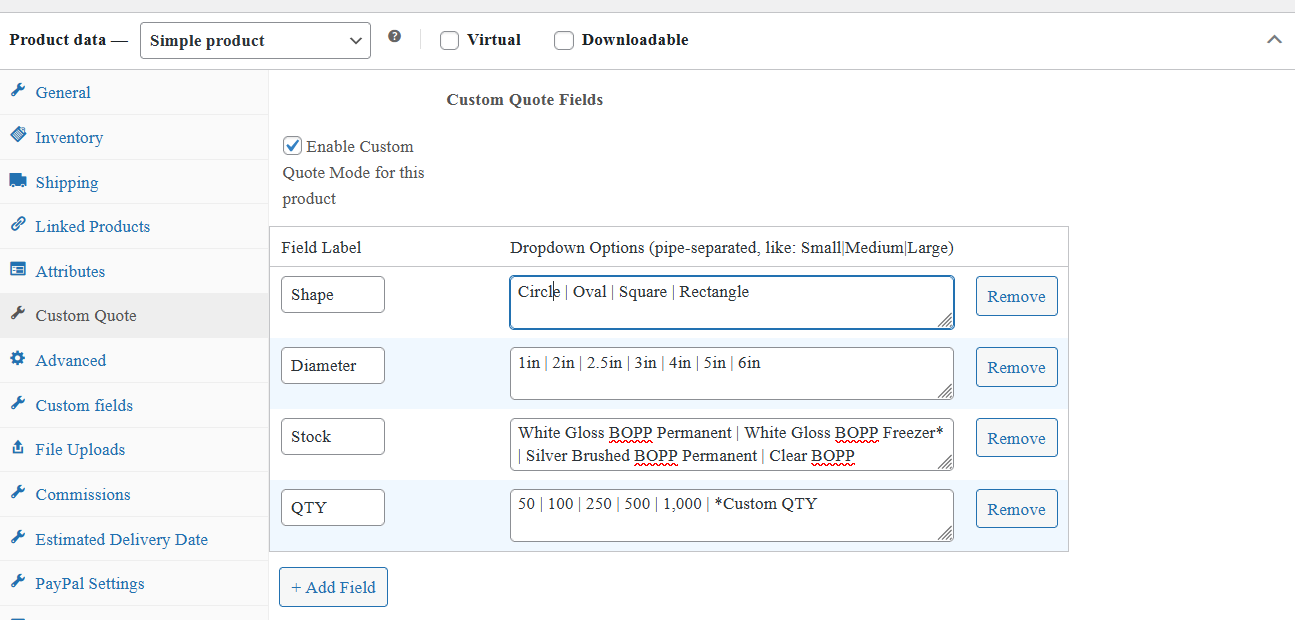
How do Custom Quote Fields work?
Quote fields define what information the customer must submit when requesting a quote.
Each product can have its own set of quote fields.
Inside the Custom Quote tab, you can add any custom fields such as:
- Shape
- Size / Diameter
- Stock / Material
- Quantity
- Finishing options
- Other custom variations needed
Each field contains:
- Field Label – displayed to the customer as the dropdown label
- Dropdown Options – values the customer can choose from
How do pipe-separated dropdown options work?
Dropdown options are entered using a pipe character (|) (*typically above your Enter Key) to separate values.
This keeps field configuration fast and predictable.
Example:
Circle | Oval | Square | Rectangle
The plugin converts each option into a dropdown selection on the product page.
Whitespace around each option is ignored, so these are all treated cleanly:
Small|Medium|Large
Small | Medium | Large
Small  |  Medium  |  Large
Recommended formatting:
- Use consistent naming (example: 2.5in instead of 2.5 inch).
- Use a clear “Custom Quantity” option when needed (example: Custom QTY).
- Keep options in the order customers should choose them.
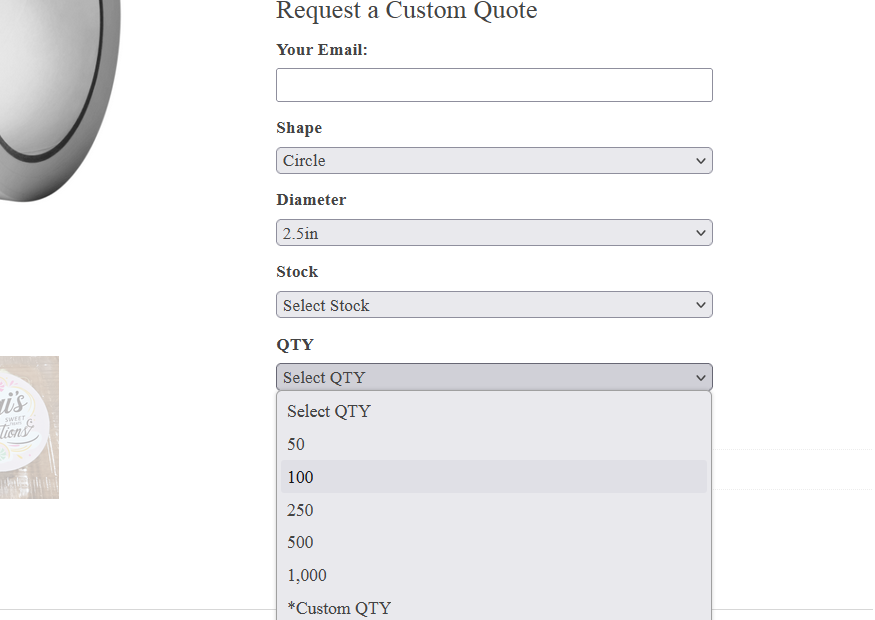
What does the customer see on the product page?
When Quote Mode is enabled, customers see a Request a Custom Quote section on the product page.
This includes:
- Email field – where the customer wants the response sent
- Your quote dropdown fields – based on what you configured in the product editor
- Submit Quote Request button
No payment is collected at this stage. The customer is requesting pricing approval.
Where do quote requests appear in the dashboard?
All quote requests appear in the WordPress admin under the Custom Quotes menu.
The quote list includes:
- Date Submitted
- Custom Quote name (click to view)
- Product reference
Quotes are displayed newest-first and include pagination to keep the screen fast and manageable.
How do I review a quote request?
Click View to open the quote details page.
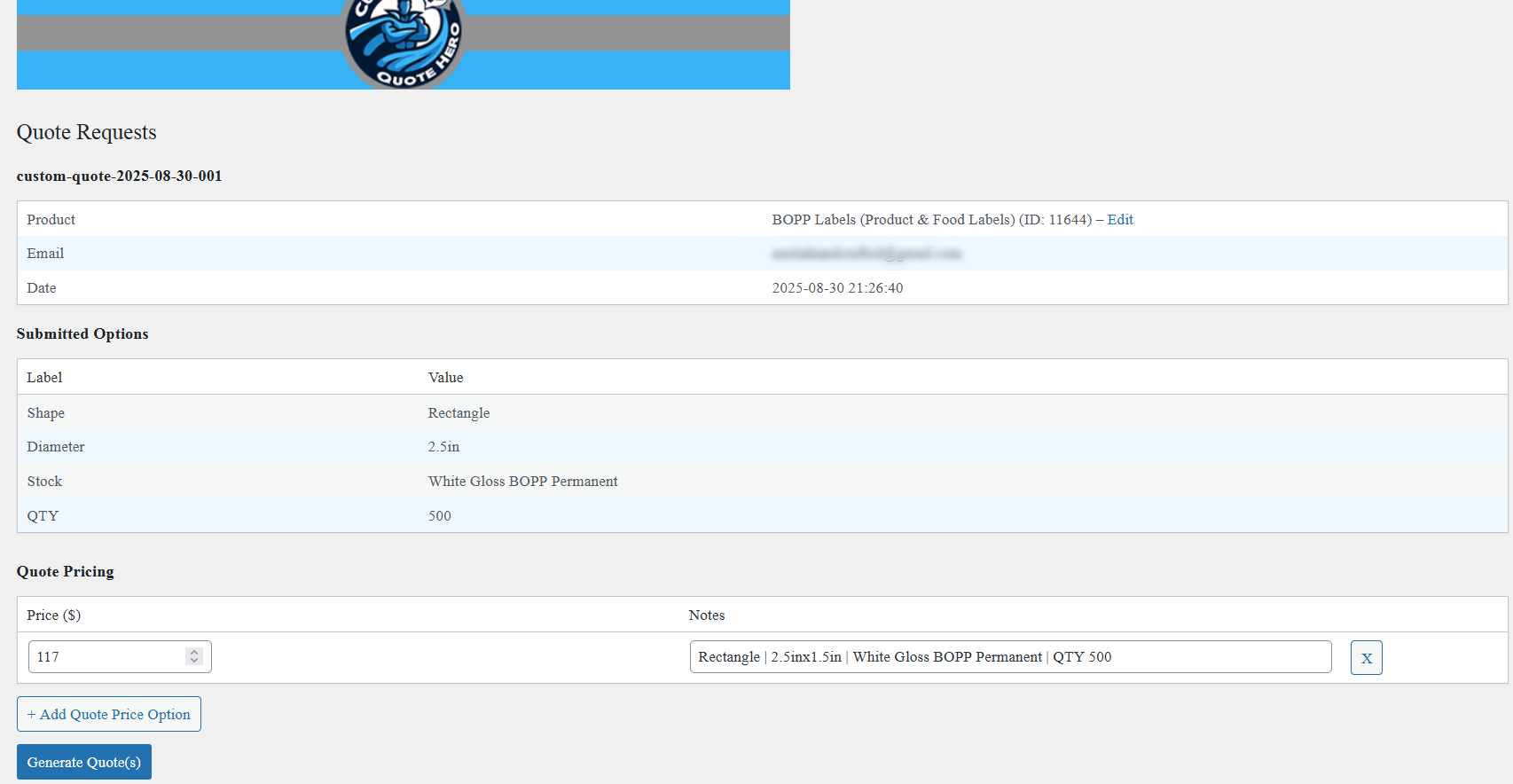
The quote detail page includes:
- Product details and a direct edit link
- Customer email
- Date submitted
- A clean list of submitted options in Label: Value format
This layout is designed for fast quoting without digging through messy email threads or form exports.
How do I add pricing and generate quote products?
On the quote details page, scroll to Quote Pricing.
Here you can:
- Add one or multiple price options
- Add optional notes per price option (useful for explaining what the price includes)
- Click Generate Quote(s) to create purchasable WooCommerce products
If you offer multiple quote options (example: economy vs premium, different materials, different turnaround),
each option becomes its own purchasable product with its own price.
How do I send checkout links to the customer?
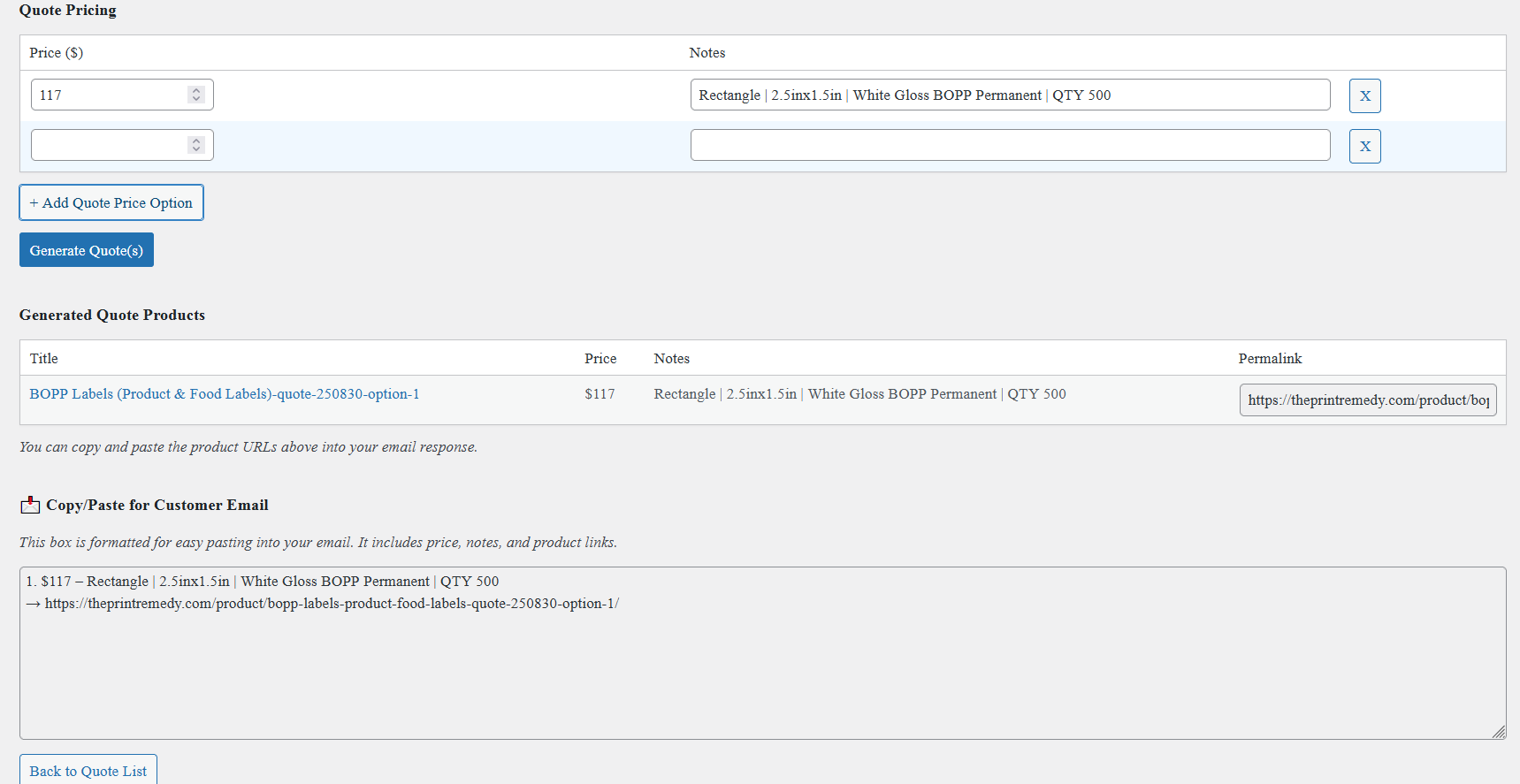
After generating quote products, the plugin displays:
- A table of generated quote products
- A formatted Copy/Paste for Customer Email box
The email box includes:
- Price
- Notes
- Direct product link(s)
You can paste this content into your email client to send the customer checkout links immediately.
Where are generated quote products stored?
Generated quote products are created as WooCommerce Simple Products.
They are assigned to a dedicated Custom Quotes product category that is intended to remain hidden
from normal browsing so your catalog stays clean.
You can edit or delete generated quote products at any time using standard WooCommerce tools.
Is this workflow safe for production use?
Yes. Custom Quote Hero uses WooCommerce-native behavior for the checkout portion of the workflow.
Quote requests are stored in WordPress and displayed in the admin. Generated products are standard WooCommerce products.
Best practices:
- Use clear quote field labels and consistent option formatting (especially for size and stock).
- If you generate multiple quote options, label your notes clearly so customers know what each price includes.
- Keep your quote products in the hidden quotes category to avoid cluttering your storefront.
Are Pro / add-on features planned?
Yes. Custom Quote Hero is free forever. Optional Pro add-ons are planned for stores that need additional automation and cleanup tools.
- Saved email templates and default response messages
- Generated quote product management (list, bulk delete, archive cleanup)
- Purchase detection to mark generated quotes as Purchased
- Expiration rules for unpurchased quote products
Still have questions?
Visit DevHero Digital for updates, documentation, and support.